


 Updated
For many traders, backtesting is the bridge between theory and practice—a way to test a strategy’s effectiveness before putting real money on the line. Whether you are manually reviewing history with the TradingView Replay tool or coding a custom strategy in the Pine Editor of Tradingview makes this process seamless.
In this complete guide, we’ll help you learn Pine Script for automated testing and how to utilise the replay indicator on TradingView for manual backtesting. We’ll share practical tips on how to backtest smarter, not harder, so you can trade with data-backed confidence.
What Is Backtesting?
Backtesting is the process of evaluating a trading strategy to by applying it to historical market data. This helps you see how your strategy would have performed in the past, giving you insights into its potential effectiveness.
By backtesting before going live, you can test and refine a strategy, avoid costly mistakes, and make more informed trading decisions with confidence.
Why Is Backtesting Important?
Without backtesting, trading can feel like guesswork. But when you test your strategy with real historical data, backtesting transforms this uncertainty into a data-driven approach.
Here are three reasons why backtesting is so important:
- Builds Confidence: Seeing how your strategy would have performed historically can help give you confidence in its potential—especially in live market conditions.
- Reinforces Discipline: Backtesting helps you stay consistent. It encourages you to follow a system instead of making impulsive, emotional decisions.
- Delivers Data-Driven Insights: You’ll uncover how well your strategy performs over time, highlighting strengths and areas for improvement.
Backtesting helps turn ideas into tested, informed strategies— potentially giving you greater clarity and consistency in your trading approach.
Related Article: The Basics of Trading Psychology
How to Backtest on TradingView: TradingView Replay & Pine Editor
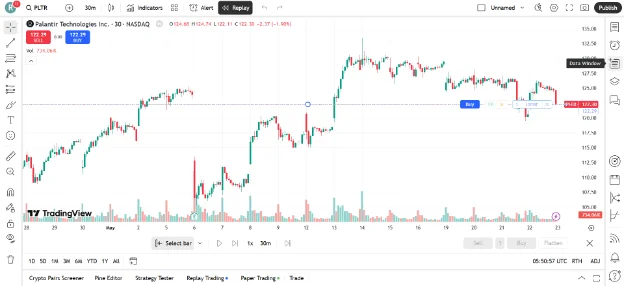
TradingView is a versatile platform for traders of all levels, offering robust tools for both charting and strategy testing. Backtesting on TradingView can be approached via two powerful methods, depending on your trading style and objectives:
Manual Backtesting With Bar Replay
Manual backtesting gives you a hands-on, real-time simulation of the market. By using the TradingView Replay feature, you can rewind the chart and simulate trades candle by candle—just like trading live, without the “hindsight bias” of knowing what happens next.
This method is ideal for discretionary traders who rely on price action or chart pattern recognition. When you activate the replay indicator on TradingView, you can apply your strategy visually, track decisions, and build confidence. It’s especially helpful for beginners looking to sharpen their skills without needing to write a single line of code.
Related Article: Top 16 Candlestick Patterns to Sharpen Your Trading Strategy
Automated Backtesting Using Pine Script
If you prefer a more technical approach or follow a strictly rule-based strategy, automated backtesting is the way to go.
Using the Pine Editor, TradingView allows you to create or customise algorithms that define exactly when to enter or exit a trade. If you take the time to learn Pine Script (TradingView’s native scripting language), you can test your ideas instantly across months—or even years—of historical data using the Strategy Tester.
You’ll get an immediate, detailed breakdown of performance metrics like:
- Profit factor
- Win rate
- Drawdown
Automated backtesting in TradingView offers a more scalable and efficient way to evaluate trading strategies over historical data. It can be a useful tool for analysing performance and identifying potential areas for refinement..
Manual Backtesting Using Replay Indicator on TradingView
Manual backtesting on TradingView is a method used by traders to simulate strategies based on historical data. It doesn’t require any coding and is often used to explore visual or discretionary trading ideas.
Here’s how to get started:
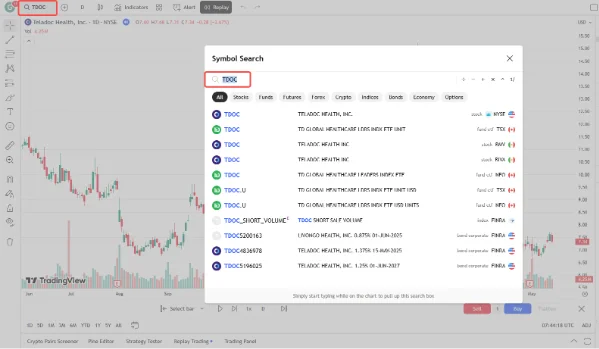
1. Open a Chart
Select the asset and timeframe you want to test your strategy on.
2. Choose the TradingView Replay Tool
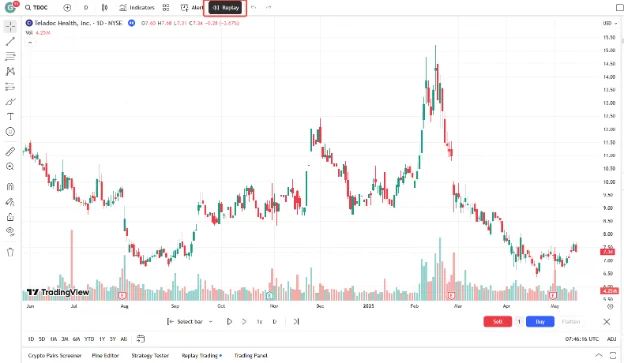
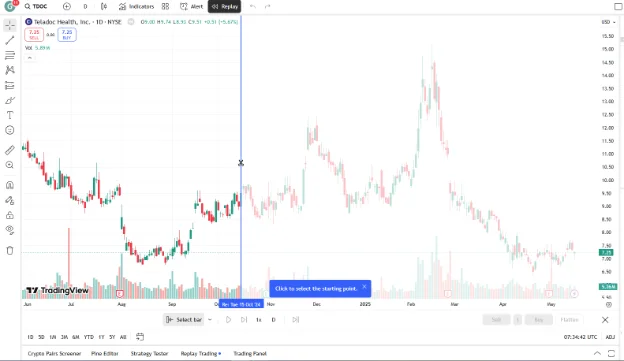
Click the Bar Replay icon in the toolbar. This tool lets you ‘rewind’ the market and view historical price action as if it were unfolding in real time.
3. Set Your Starting Point
Once you select the replay indicator on TradingView, a vertical red line will appear. Click on a specific date in the past where you want your backtest to begin. From that moment on, only the candles that would have been visible at the time will appear, helping to avoid future bias.
Note: This setup can help simulate real-time decision-making based on historical market conditions.
4. Playback Control
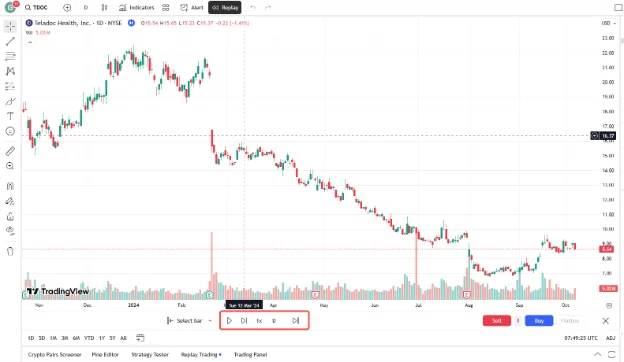
Take control of the pace. Use the play button to automate the flow or click through each candle manually to study price action in detail.
5. Manually Record Hypothetical Trades
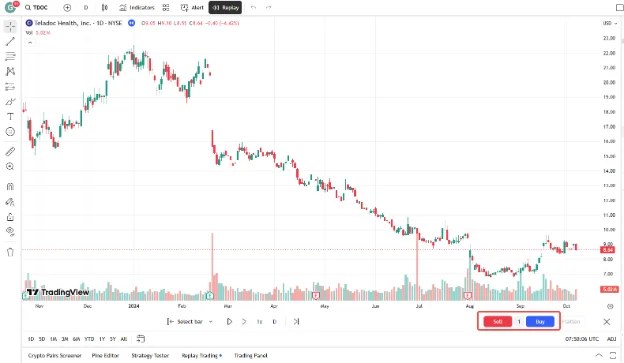
Follow your own strategy rules. When a setup appears, you can log hypothetical trades—such as entry price, stop-loss, and take-profit levels—for analysis purposes.
Since you are in TradingView replay mode, you can’t see the “future,” which makes your recorded entries much more realistic.
6. Document the Results
Track the outcome of each trade. After testing a series of setups, review your results—look at your win rate, risk-to-reward ratios, and overall profitability to assess the strategy’s potential.
How to Set Up Automated Backtesting with the Pine Editor On TradingView
1. Open the Pine Script Editor
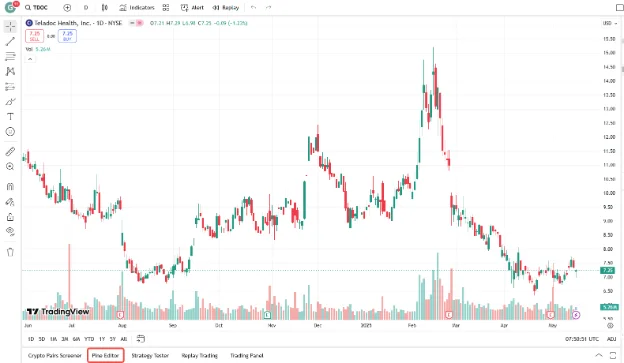
At the bottom of the TradingView interface, click on Pine Editor to begin writing or modifying your strategy.
2. Code or Import a Strategy
To truly master automation, you should aim to learn Pine Script on TradingView. You can start by defining simple entry and exit conditions, stop-losses, and take-profit levels.
Alternatively, you can consider importing an existing strategy from TradingView’s public script library [2] and adapt them as needed for educational purposes.
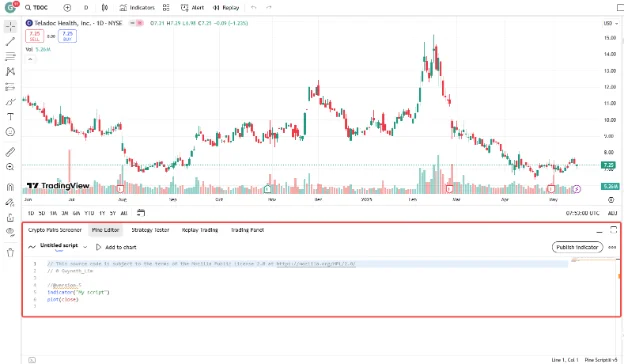
3. Add the Strategy to Your Chart
Once your script is ready, click Add to chart to overlay the strategy and view the historical behaviour of the strategy.
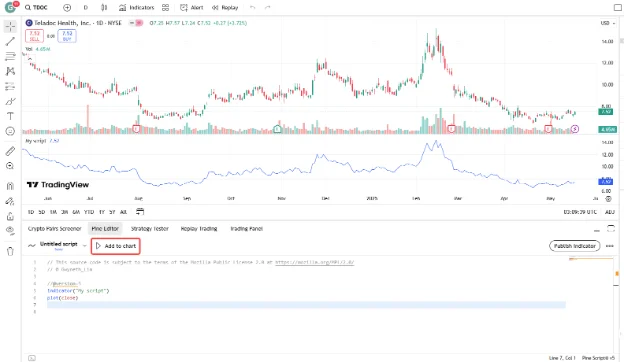
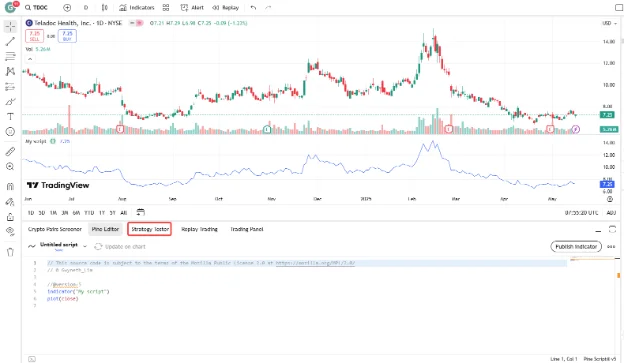
4. Access the Strategy Tester
Open the Strategy Tester tab to view a detailed performance summary, with key metrics like net profit, drawdown, win rate, and more.
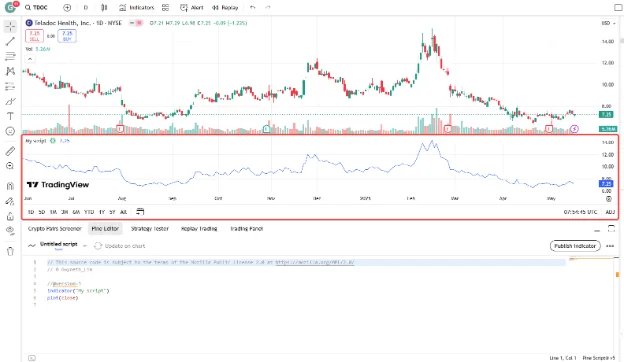
5. Analyse the Results
Examine individual trades. Check for inconsistencies, unrealistic assumptions, or signs of overfitting.
6. Refine and Repeat
Backtesting is an iterative process. Return to the Pine Editor to adjust your parameters and retest. Continue refining your logic until the results align with your risk tolerance and trading goals, giving you the confidence to eventually transition toward live markets.
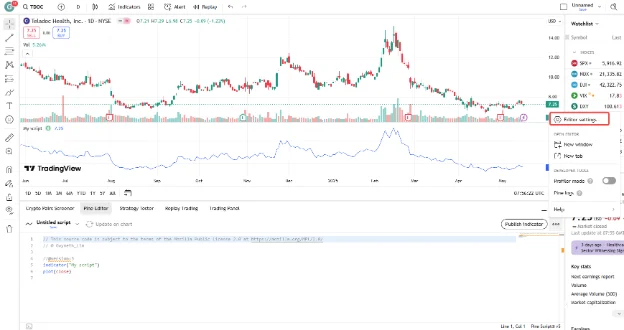
Can You Backtest on TradingView for Free?
Yes, you can backtest on TradingView for free using its core tools like the Bar Replay feature and Pine Script strategy testing (but with limitations) [3].
Even on a free TradingView plan, users have access to essential backtesting functions, making it a great starting point for traders who want to validate strategies without committing to a paid subscription.
What’s Included in the Free Plan?
With a free TradingView Basic account, you can:
- Manually Simulate Trades (but not deep backtesting): Use the TradingView replay tool to rewind charts and practice. On the free plan, this is available for daily, weekly, and monthly timeframes (but not by the minute or second).
- Automate Your Logic: Open the Pine Editor on TradingView to write or modify basic scripts and see how they perform.
- View Results: Use the Strategy Tester to see net profit, win rate, and drawdown metrics for any script you run.
- Test strategies: Use the one chart layout, but have access to limited indicators and alerts
While the free version is robust enough for beginner-level backtesting, upgrading your plan unlocks more advanced capabilities—like historical data by the minute, time price opportunities, and deep backtesting.
Related Article: 3 Commonly Used Indicators on TradingView to Improve Your Trading Strategies
When to Consider Upgrading Your TradingView Plan
If you’re testing multiple strategies or working with more complex scripts, a paid plan may be worth it for:
- Deeper historical data
- Multiple indicators and overlays
- Simultaneous chart layouts (great for multi-timeframe strategies)
- More saved chart layouts and alerts
These plans offer enhanced features to support more sophisticated backtesting needs.
Avoid 4 Costly Mistakes Traders Usually Make When Backtesting

Even the best strategy can fall apart if your backtesting process has flaws. Here are four common mistakes to watch out for:
Not Using Enough Historical Data
Backtest your strategy across a broad time range—not just a few hand-picked weeks—to ensure it holds up across multiple market cycles.
Overfitting to Past Data
If your strategy looks too perfect in backtests, it might be over-optimised. Take note that in live trading, simpler and more robust strategies tend to outperform overly complex ones.
Ignoring Real-World Trading Costs
Backtests often look great—until you factor in slippage and commissions. A strategy that looks great on paper can turn unprofitable when trading costs are included.
Skipping Diverse Market Conditions
Remember that markets don’t move in one direction. Test your strategy across bullish, bearish, and sideways conditions. The more scenarios you cover, the more confidence you’ll have when the market shifts.
Take the Final Step—Without Taking the Risk
Backtesting on TradingView is a powerful way to validate and fine-tune your trading strategies. Whether you’re manually testing with the TradingView replay feature or running automated scripts in the Pine Editor, TradingView provides the features you need to trade with confidence.
The key to long-term success is staying consistent and realistic. Once you have used the replay indicator on TradingView to confirm your edge, the next logical step is to see how those setups perform in a live brokerage environment.
Interested in putting your strategy to the test?
You can learn Pine Script on TradingView and then execute those ideas directly through a broker. Open a free demo account with Vantage (preloaded with $100,000 virtual funds) and link it to your TradingView profile. This allows you to practice in real-time market conditions without risking a cent of your own capital.
RISK WARNING: CFDs are complex financial instruments and carry a high risk of losing money rapidly due to leverage. You should ensure you fully understand the risks involved and carefully consider whether you can afford to take the high risk of losing your money before trading.
Disclaimer: The information is provided for educational purposes only and doesn’t take into account your personal objectives, financial circumstances, or needs. It does not constitute investment advice. We encourage you to seek independent advice if necessary. The information has not been prepared in accordance with legal requirements designed to promote the independence of investment research. No representation or warranty is given as to the accuracy or completeness of any information contained within. This material may contain historical or past performance figures and should not be relied on. Furthermore estimates, forward-looking statements, and forecasts cannot be guaranteed. The information on this site and the products and services offered are not intended for distribution to any person in any country or jurisdiction where such distribution or use would be contrary to local law or regulation.
References
- “Welcome to Pine Script® v6 – TradingView”. https://www.tradingview.com/pine-script-docs/welcome/. Accessed on 19 May 2025.
- “Public Library Pine Script – TradingView”. https://www.tradingview.com/pine-script-docs/v3/public-library/. Accessed on 19 May 2025.
- “Try any of our plans, free for 30 days – TradingView”. https://www.tradingview.com/pricing/. Accessed on 19 May 2025.